
Version Control Basics for dbt Projects
I use this dbt workflow: branch, test, review, merge, and deploy. I keep each change focused and check it in an isolated development or CI target before it reaches production.
Here’s what I check along the way:
- Track the right files: Commit project code, tests, docs, and dependency files - not credentials or generated output.
- Make review easy: Use short-lived branches, related commits, and PRs that explain the change and its risks.
- Test before merging: Compile the project, build affected resources, and require passing checks and reviewer approval.
- Deploy the approved code: Record the commit SHA and job results so I can trace what ran.
- Plan for failure: Resolve conflicts, rerun checks, and use a reviewed revert when needed.
My rule: <u>code recovery and data recovery are separate</u>. A Git revert can undo model logic, but it cannot restore rows already changed in the warehouse. I plan for both before deployment.
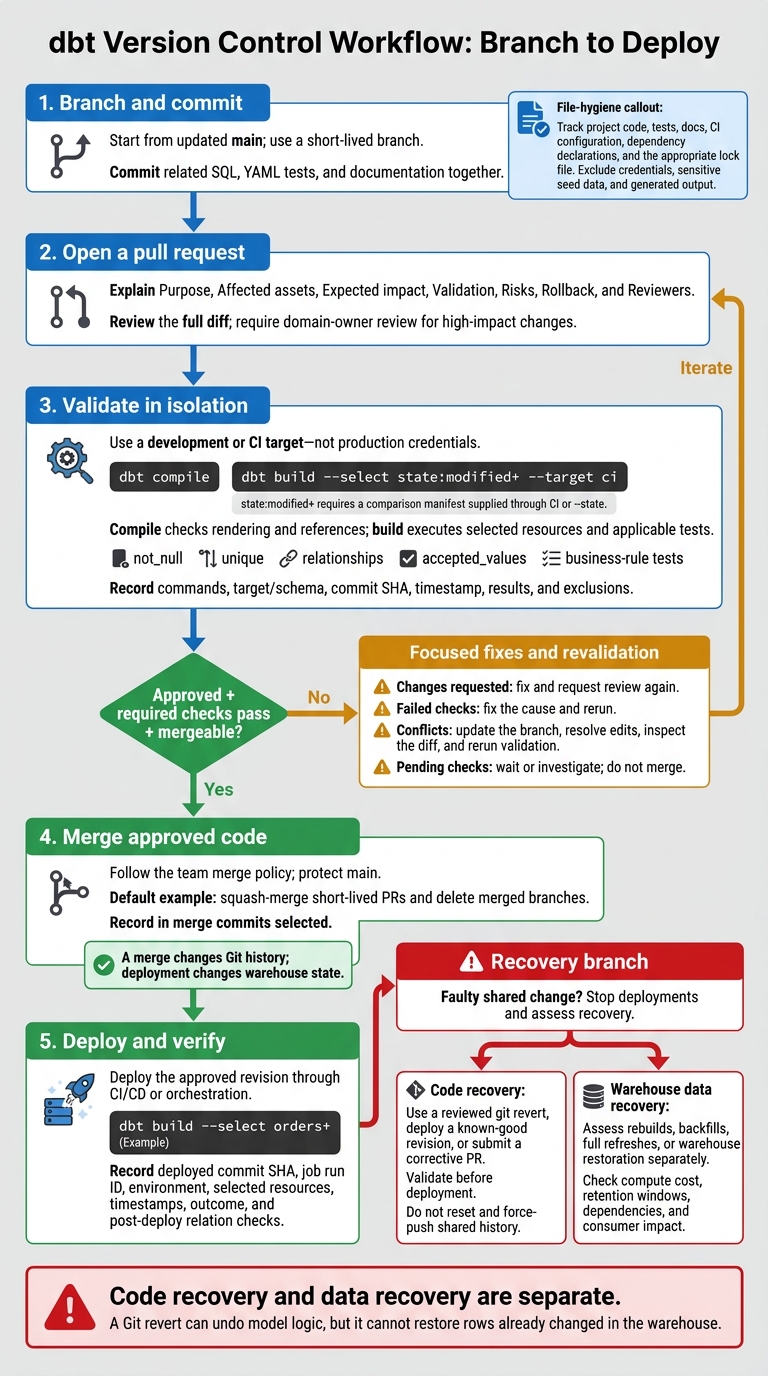
dbt Version Control Workflow: Branch to Deploy
Set Up CI Pipeline for dbt Core Projects Using GitHub Actions - Step by Step Tutorial
sbb-itb-61a6e59
Understand Git Repositories, Commits, and Branches
Git tracks changes to dbt models, tests, macros, and YAML files so teams can work together. Mastering these workflows is a core part of data engineering excellence. Hosting services add pull requests, comments, permissions, and automated checks on top of Git.
| Git concept | Meaning in dbt work |
|---|---|
| Repository | The project’s history and Git metadata, stored locally and often shared remotely. |
| Working tree | The checked-out SQL, YAML, and other files you edit. |
| Staging area, or index | The exact file contents selected for the next commit. |
| Commit | A recorded snapshot with an ID, author, timestamp, message, and parent history. |
| Local branch | A movable reference to the latest commit in a line of development. |
| Remote repository | Another repository, usually hosted for team collaboration. |
| Remote-tracking branch | A local pointer, such as origin/main, that reflects the last fetched state of the remote branch. |
A branch is a pointer, not a full copy. Fetching remote changes with git fetch updates origin/main; it doesn't stay in sync automatically.
Choose Which dbt Files to Track
Track the files your team needs to build, test, and understand the project: SQL models, model and source YAML, tests, macros, snapshots, dbt_project.yml, safe-to-share seeds, documentation, CI configuration, and dependency declarations such as packages.yml or dependencies.yml. Include the appropriate lock file for your package setup.
Ignore generated files, local-only tooling, and configuration that contains secrets. Keep credential-bearing profiles.yml files, private keys, production credentials and connection settings, and sensitive seed data out of Git.
A .gitignore won't remove files Git already tracks. If you've committed a sensitive file, use git rm --cached to stop tracking it, then add an ignore rule. The file still exists in earlier commits, so rotate exposed credentials and follow your team’s approved history-cleanup procedure when needed.
Stage and Commit Related Changes
Inspect your changes, stage only what you intend to include, and commit locally. Then push to share your work.
git statusidentifies modified, staged, and untracked files.git diffshows unstaged edits.git diff --stagedshows the contents selected for the next commit.
Use one commit per related change. Group the SQL, YAML tests, and documentation for that change so reviewers can follow the dbt diff and revert it if needed. Leave unrelated formatting changes out.
Work on Short-Lived Branches
Use short-lived branches to keep focused work separate before review. Clone the team repository once with git clone. For each change, start with a clean working tree, update local main, and create a branch:
git fetch origin
git switch main
git pull --ff-only origin main
git switch -c fix/orders-revenue
After editing, staging, and committing, publish the branch with git push -u origin fix/orders-revenue. It's then ready for pull request review and dbt validation.
Review Pull Requests and Validate dbt Changes
A pull request (PR) asks teammates to review a branch before it merges into main or another target branch. Branch protection can require reviews and passing checks before a merge. The PR acts as the review gate between branch work and merge.
Explain the Change and Review the Diff
Use a PR template with these fields: Purpose, Affected assets, Expected impact, Validation, Risks, Rollback, and Reviewers.
Review the full diff, including SQL, YAML, macros, variables, packages, and project configuration. Check joins, filters, date bounds, null handling, incremental logic, grain, dependencies, materialization, naming, docs, and downstream impact. In YAML files, inspect descriptions, column names, tests, tags, owners, and contracts.
Require domain-owner review for high-impact models or metric changes. In the rollback field, distinguish between reverting code and recovering warehouse data - they're separate tasks.
Run dbt Checks Before Approval
Once the diff looks right, validate it in CI or a development target. Run checks in an isolated target, never with production credentials.
Start with dbt compile to check SQL rendering and references. Compilation can reveal syntax, reference, configuration, and environment problems. But it doesn't execute model SQL or prove that the data is correct. Then run a scoped dbt build:
dbt build --select state:modified+ --target ci
This selects modified nodes and their downstream children. The build executes selected resources in dependency order and runs applicable tests. The state:modified+ selector requires a comparison manifest supplied through CI or --state.
Include relevant generic tests - not_null, unique, relationships, and accepted_values - plus singular tests for business rules. Check incremental behavior, runtime, scanned data, and warehouse cost. The goal is to validate warehouse behavior, not just code.
Record the exact commands, target or schema, commit SHA, timestamp, results, and exclusions in the PR. Keep production credentials out of reach of untrusted PR code. Use least-privilege CI credentials, protected secrets, and isolated write access.
Respond to Reviews and Failed Checks
Use the PR's status to decide what happens next.
| PR condition | Meaning | Next action |
|---|---|---|
| Approved | Reviewers accepted the change. | Confirm that required checks and mergeability requirements also pass. |
| Changes requested | A reviewer identified an issue. | Make a focused fix, push a follow-up commit, and request another review. |
| Merge conflict | The branch cannot merge cleanly. | Update the branch from the target branch, resolve conflicting edits, inspect the resulting diff, and rerun validation. |
| Failed validation | A required check failed. | Inspect the first meaningful failure, fix its cause, and rerun checks. |
| Pending validation | Validation is incomplete. | Wait for completion or investigate the CI job; do not merge yet. |
Push fixes to the same branch, update tests when needed, and rerun the required workflow. If an upstream failure caused downstream nodes to be skipped, fix that failure first.
Configure branch protection to require independent reviews, resolved conversations, and passing checks on the latest commit. Restrict direct pushes and require branches to be up to date before merging.
Merge, Deploy, and Recover dbt Changes
Once the PR is approved and checks pass, merge and deploy the revision through your configured CI/CD or orchestration process:
For an approved
ordersstatus-filter fix, the deployment job must check out the approved revision and rundbt build --select orders+.
A merge changes Git history; deployment changes warehouse state. Record the deployed commit SHA, job run ID, environment, selected resources, timestamps, outcome, and post-deploy relation checks.
Your merge method determines how easy it is to trace the change in main.
Set a Team Merge Policy
Document one default merge method, required approvals and checks, ownership rules, and the deployment trigger. A useful default: squash-merge short-lived PRs, protect main from force-pushes, and delete merged branches. Rebase rewrites commit IDs; do not rebase shared branches.
| Method | Effect on history | Traceability and caution |
|---|---|---|
| Merge commit | Preserves branch topology and adds an explicit merge commit. | Keeps branch context and a clear integration point. |
| Squash merge | Combines the PR into one commit on main. |
Keeps history concise, but does not retain individual development commits on main. |
| Rebase-and-merge | Replays individual commits without a merge commit. | Keeps history linear, but rewrites commit identifiers. |
Resolve SQL and YAML Merge Conflicts
Use the common base to resolve conflicts. Don’t blindly choose “ours” or “theirs.” Reconstruct the intended SQL, then check YAML indentation, lists, tests, and configuration.
Remove conflict markers and review the complete files before staging the resolutions and finishing the merge or rebase. Coordinate with the model owner if grain, keys, dependencies, or incremental logic changed. Treat resolved conflicts as new code: rerun parsing, compilation, affected tests, and an appropriate development or staging run before approval.
git status
git diff
# Resolve conflicted SQL and YAML; remove all conflict markers.
git add models/orders.sql models/schema.yml
git commit                 # Finish a merge.
# For a rebase, use git rebase --continue instead.
Revert Code and Assess Warehouse Recovery
If a shared change is faulty, stop deployments and use a reviewed git revert rather than resetting and force-pushing shared history. Reverting a merge requires choosing a mainline parent: git revert -m 1 <merge-commit> preserves parent 1’s side, so confirm the parent order before running it.
Validate and deploy the revert, deploy a known-good revision, or submit a corrective PR if some changes need to stay.
Git rollback and warehouse recovery are separate operations. Rolling back code does not restore tables, incremental rows, snapshot history, or deployed artifacts. Assess rebuilds, backfills, full refreshes, or warehouse restoration separately. Before recovery, check compute cost, retention windows, dependencies, and the impact on consumers.
Conclusion: dbt Version Control Checklist
Before merging, check that you have one shared repository, a protected main, short-lived branches, focused commits and PR reviews, passing dbt checks, and a rollback plan for both code and warehouse data.
Use this guide to decide whether to branch, fix, revert, or open a follow-up PR.
| Work item | Choose it when | Next action |
|---|---|---|
| Feature branch | Adding a model or feature | Test affected resources; request review. |
| Bug-fix branch | Correcting existing behavior | Add a regression test; request review. |
| Revert pull request | Undoing a merged change | Review the revert; assess data recovery. |
| Follow-up pull request | Correcting a merged change | Open a focused PR; rerun checks. |
To address feedback before merging, update the existing branch unless the scope changes.
For each change, work through the checklist: branch, test, review, merge, and document recovery.
FAQs
How do I choose which dbt changes to test?
Test every dbt model change or refactor for uniqueness, non-null constraints, and business logic. Check data quality and how the change affects downstream models and reports.
When logic, filters, or metric definitions change, prioritize row-count checks to catch data loss or fan-out issues.
Use custom singular tests for complex business rules. Add tests to CI/CD so faulty code gets blocked before it merges.
How can we avoid conflicts when editing shared models?
Keep models small, focused, and reusable to reduce overlapping changes. Keep each pull request focused on one logical unit of work, such as a single model update or a change to a metric definition.
Use Git branches to keep your work separate from the main codebase. For larger tasks that span staging, core, and marts, merge upstream changes before updating downstream dependencies.
When should I revert versus fix forward?
Revert when a deployment causes critical errors that disrupt production or downstream reporting, block business operations, or produce incorrect metrics. A revert restores the last known good state.
Fix forward for minor issues or when implementing, testing, and deploying a fix takes less time than reverting. Follow the standard pull request process, document the fix, and update the test evidence to maintain pipeline integrity.