
Stateful Stream Aggregations: Core Concepts
Stateful stream aggregations keep running totals as events arrive. I start by defining what each count means - for example, events per customer in a 5-minute window - then set rules for late data, state cleanup, and recovery.
Here’s how I break down the design:
- Keys and windows: Decide which events belong together and how much state stays in memory or on disk.
- Event time and watermarks: Put delayed events in the right window and set when old state can be removed.
- Triggers and output modes: Choose when Spark runs and whether consumers receive final counts, changed rows, or full snapshots.
- Checkpoints and sink writes: Restore progress after failures without counting replayed results twice.
I use a Spark Structured Streaming example with Kafka input, a 10-minute watermark delay, and durable checkpoints to connect these choices. I also cover state-size estimates, monitoring, and failure tests, with brief context on Flink and Kafka Streams.
The rule I keep in view: <u>a checkpoint supports recovery; it does not make every sink write exactly once.</u>
The Internals of Stateful Stream Processing in Spark Structured Streaming -Jacek Laskowski
sbb-itb-61a6e59
Keys, Event Time, Windows, and Watermarks
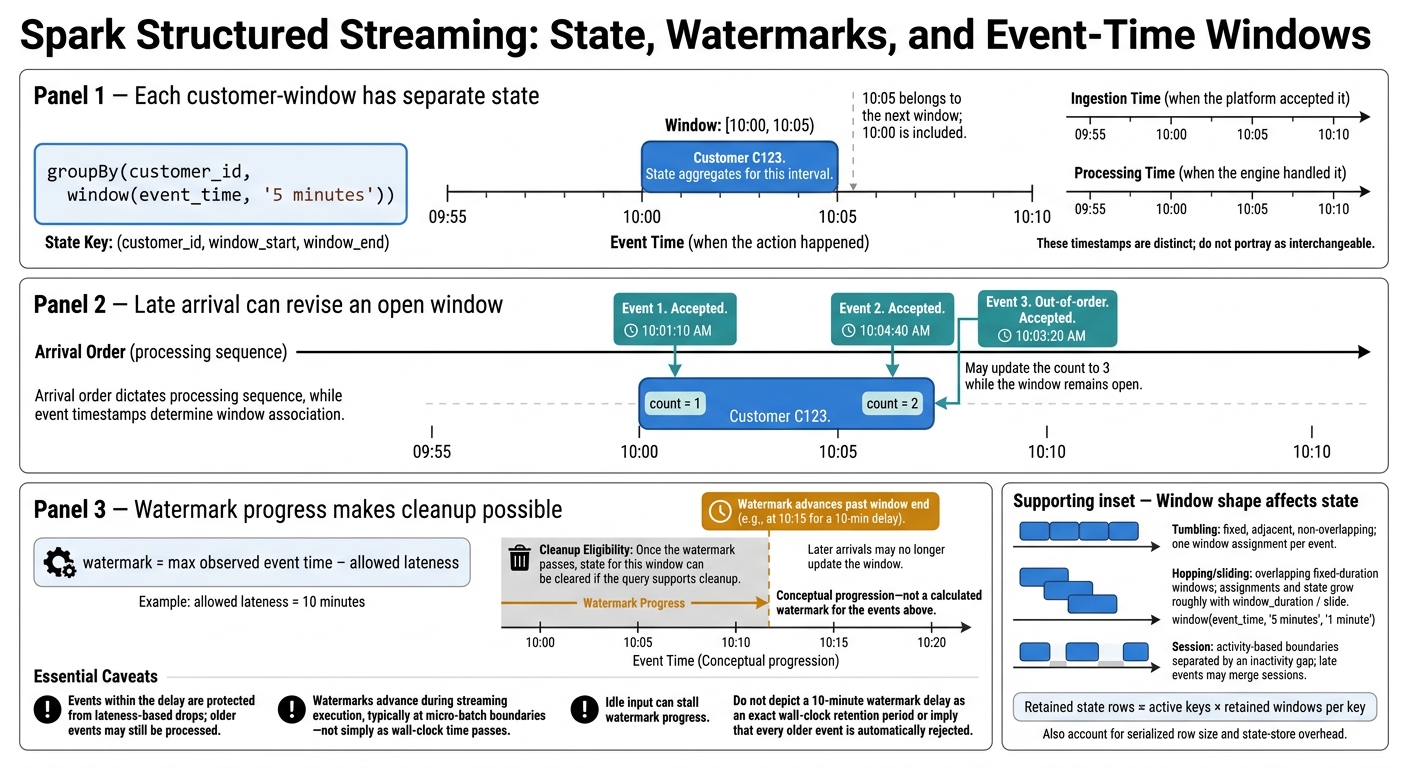
Spark Watermarks, Late Events, and Window Cleanup
Choose Grouping Keys and Timestamps
Once you have state, your grouping key and event-time choice determine how much you create.
Group by (customer_id, window(event_time, '5 minutes')). Grouping by the window alone counts all customers together. Check that customer IDs are stable, non-null, and normalized. More distinct IDs mean more state entries. A skewed ID creates a hot key that can bottleneck one partition. Monitor key-frequency distributions before trying salting, which requires safely recombining partial aggregates.
Event time records when an action happened. Ingestion time records when the platform accepted it, while processing time records when the engine handled it. Use validated event time so delayed purchases update the correct interval. Check time zones, nulls, and future-dated records, and keep ingestion and processing timestamps for latency analysis.
Window Types and State Size
Window shape controls both state growth and how often results appear.
| Window type | Overlap and boundaries | State impact | Use case |
|---|---|---|---|
| Tumbling | Fixed, adjacent, non-overlapping intervals | One window assignment per event; generally the smallest fixed-window state | Periodic customer counts |
| Hopping/sliding | Fixed-duration windows repeating at a slide interval | Overlap increases state and output volume roughly in proportion to window_duration / slide |
Rolling dashboards and smoothed rates |
| Session | Activity-based boundaries separated by an inactivity gap | Variable state because sessions remain open and late events may merge them | Customer visits and browsing sessions |
In Spark, window(event_time, '5 minutes', '1 minute') creates fixed-duration windows that repeat at the slide interval. That means one event can update several overlapping windows.
The state key is effectively (grouping_key, window_start, window_end), so customer-level counting keeps separate state for each customer-window pair. To estimate state, multiply active keys by simultaneously open windows, then account for serialized row size and state-store overhead.
For tumbling windows, document boundaries as
[10:00, 10:05): an event exactly at 10:05 belongs to the next window.
Session windows start with activity instead. They may merge when later events bridge the inactivity gap.
Watermarks, Late Events, and State Cleanup
Illustrative Spark retailer scenario: Customer
C123has events at 10:01:10 AM and 10:04:40 AM, producing a count of 2 for 10:00–10:05 AM. An out-of-order event timestamped 10:03:20 AM may still raise the count to 3 because that window remains open.
For a single input, Spark’s watermark is conceptually max event time minus the allowed lateness. It advances during streaming execution, typically at micro-batch boundaries - not simply because wall-clock time passes. Events within the delay are protected from lateness-based drops; older events may still be processed.
Once the watermark passes a window’s end, the engine can clear that window’s state if the query supports cleanup. Later arrivals may no longer update it. Choose the delay based on observed arrival patterns, and test idle periods as well as normal traffic.
Protect late-but-valid events within the delay budget, then allow eligible state to be cleaned up. With keys, windows, and lateness set, the next decision is when each engine emits results.
Triggers and Output Modes
Stateful aggregation means deciding when to emit results and how to persist them. Watermarks control when state can close, but Spark’s trigger settings determine when it runs.
Execution Timing and Window Completion
A processing-time trigger schedules each micro-batch. Spark can emit intermediate counts while a window is still open, but final output depends on watermark progress, not trigger timing.
Idle input can delay final output because the watermark advances only when newer event times arrive. Spark’s AvailableNow mode can also run a final no-data batch to apply watermark-driven cleanup before it terminates.
The output mode determines whether consumers receive final rows, changed rows, or full snapshots.
Append, Update, and Complete Modes
| Mode | Records consumers receive | When useful | Sink requirements |
|---|---|---|---|
| Append | Newly finalized aggregate rows | Final window results when consumers can wait | Sink that supports append writes |
| Update | Rows changed since the previous trigger | Low-latency counts and revisions | Sink that supports updates, upserts, or changelogs |
| Complete | The entire current result table after every trigger | Small, full snapshots | Sink that accepts repeated full snapshots |
Choose a mode based on finality, latency, and sink support. For those looking to master data engineering at a professional level, understanding these trade-offs is critical. Spark does not support update mode for streaming session-window aggregations.
The output mode defines what Spark emits. It does not determine whether sink retries produce duplicate business results.
Sink Writes and Duplicate Results
Preventing duplicates after retries also requires correct sink commits and checkpoint recovery.
For revised retailer counts in update mode, use
(retailer_id, window_start, window_end)as the logical key; upserts replace prior counts, while changelogs record revisions. Appending each update can create duplicate final counts and double-count later queries.
Build and Run Stateful Aggregations in Spark Structured Streaming
Build Watermarked Customer Event Counts
Use Spark Structured Streaming with Kafka input, object-storage output, and durable checkpoints. The source contains JSON fields customer_id STRING, event_type STRING, event_time TIMESTAMP, and optional event_id STRING. This implementation follows the Spark 4.0.1 Structured Streaming documentation.
The example puts the earlier rules into practice: stable keys, event-time watermarks, bounded windows, and durable checkpoints.
from pyspark.sql import functions as F

spark.conf.set("spark.sql.session.timeZone", "UTC")
schema = """
customer_id STRING, event_type STRING,
event_time TIMESTAMP, event_id STRING
"""

# Kafka input is unbounded, so keep ingestion time for diagnostics.
raw = (
    spark.readStream.format("kafka")
    .option("kafka.bootstrap.servers", "kafka:9092")
    .option("subscribe", "customer-events")
    .load()
)
parsed = raw.select(
    F.from_json(F.col("value").cast("string"), schema).alias("e"),
    F.col("timestamp").alias("kafka_time")
).select("e.*", "kafka_time")
# This pipeline counts page_view and purchase events; invalid records are excluded. valid = parsed.filter( F.col("customer_id").isNotNull() & (F.length(F.trim("customer_id")) > 0) & F.col("event_time").isNotNull() & F.col("event_type").isin("page_view", "purchase") ) # Apply the watermark before grouping on the same event-time column. counts = ( valid.withWatermark("event_time", "10 minutes") .groupBy("customer_id", F.window("event_time", "5 minutes")) .count() )
Each state key is (customer_id, window_start, window_end). Repeated event IDs still count; add deduplication separately if needed. Send malformed and future-dated records to quarantine before they reach the watermark. The 10-minute delay supports window cleanup - it does not guarantee that every older event will be accepted.
Append mode writes finalized window counts:
# Keep this checkpoint on durable, access-controlled storage dedicated to this query.
query = (
    counts.writeStream.format("parquet")
    .outputMode("append")
    .option("path", "s3a://analytics/customer-counts/")
    .option("checkpointLocation",
            "s3a://analytics/checkpoints/customer-counts/")
    .trigger(processingTime="30 seconds")
    .start()
)
query.awaitTermination()
The same pattern applies beyond Spark, but each streaming engine exposes state and time through different APIs.
State and Time in Kafka Streams and Flink
Kafka Streams and Flink use the same ideas, with different APIs for state, watermarks, and windows.
Once the query is defined, estimate its state size and test recovery before production.
Estimate State Size and Test Recovery
Before deployment, record key cardinality, window shape, lateness, trigger interval, accumulator size, input rate, checkpoint location, and sink commit behavior.
Estimate retained rows as active keys × retained windows per key. Include overlapping windows and windows waiting for watermark cleanup - not just window duration divided by slide. Larger accumulators use more bytes per row. Without eviction, state can grow indefinitely. Check query.lastProgress for watermark progress, throughput, and state growth.
| Symptom | Check and action |
|---|---|
| Growing state | Check watermark progress, key cardinality, overlap, and retention; verify that cleanup is possible. |
| Delayed output | Check event-time progress and idle input before shortening the trigger. |
| Late-event drops | Compare timestamps with the observed watermark; extend lateness only when required. |
| Slow, skewed tasks | Measure hot customer IDs and consider repartitioning or a different aggregation design. |
| Duplicate sink records | Verify checkpoint reuse, sink commits, and replay behavior. |
| Large complete-mode snapshots | Reduce retained groups or choose incremental output with a compatible sink. |
Test window-boundary timestamps, out-of-order arrivals, malformed records, duplicate IDs, and events behind an already-advanced watermark. Confirm that duplicates increase this pipeline’s count unless you add deduplication.
Pause input to test stalled finalization. Then stop the driver during processing and restart with the same checkpoint. Test schema and query-plan changes separately: checkpoint state belongs to the query, so it is not a portable backup for arbitrary new logic. Before production, verify watermark progress, state growth, committed results, and sink replay behavior under driver and executor failures.
Conclusion: Match State Retention to Output Needs
Design state around the output you need. Keys define aggregate identity, windows set the time scope, and state stores hold intermediate results. Watermarks control cleanup, triggers control execution, and output modes determine what downstream systems receive.
Match retention to your late-arriving data and recovery needs. Set the watermark delay based on observed lateness. Longer delays require more state and postpone finalization. Shorter delays save resources but risk dropping late records.
Checkpoints support recovery, but they don’t guarantee exactly-once writes to every external sink. Sink writes must still be idempotent, transactional, or deduplicated with a deterministic key.
Document the state contract: key, timestamp, window, watermark, trigger, output mode, retention policy, checkpoint strategy, and replay-safe sink writes.
FAQs
How do I choose a watermark delay from real traffic?
Start by measuring how much time passes between an event occurring and its arrival in live traffic. Send late-arriving records to a side output or dead-letter topic instead of discarding them. Then review the timestamp differences to fine-tune the delay.
A shorter delay lowers latency but risks data loss. A longer delay helps include more records but can slow processing. Monitor watermark delay metrics to keep the setting aligned with your system’s requirements.
How can I correct counts after a window closes?
Set an allowed-lateness period so the system keeps window state and updates counts when late events arrive within that period.
Send records that arrive after the cutoff to a side output or dead-letter topic for auditing. Review these records to fine-tune the limit, keeping counts accurate without letting state grow indefinitely.
How do I safely change a stateful query?
Stop the query before changing its logic. If the state schema changes, use a new checkpoint location. To reuse existing state, make sure the updated query supports the stored state version.
For event-sourcing patterns, upcasters can convert older event schemas at runtime without changing stored events. Before deploying, test with small, isolated datasets to check that results remain correct after a restart or replay.