
Databricks Warehouse HA: 7 Design Patterns
More clusters won’t keep queries running through every outage. I start by setting recovery-time and data-loss limits, then choose patterns that cover the failures your workload must survive.
Here’s how I group the seven patterns:
- Multi-cluster scaling: Add capacity to reduce queueing during query bursts.
- Availability-zone resilience: Use supported zone placement and failover behavior to recover from zone-level problems.
- Failover routing: Send traffic to another warehouse or region - with the required data and dependencies ready.
- Bounded retries: Recover from brief errors without endless retries or duplicate writes.
- Stateless compute: Replace failed compute while keeping durable data in storage.
- Warm or cold standby: Balance recovery time against idle compute cost.
- Dedicated warehouses: Keep batch and analyst traffic from crowding out critical queries.
Quick Comparison
| Pattern | Main purpose | Main tradeoff |
|---|---|---|
| Multi-cluster scaling | Handle query bursts | More running capacity costs more |
| Zone resilience | Recover from zone problems | Queries may still restart |
| Failover routing | Cover warehouse or regional outages | Requires routing and ready dependencies |
| Bounded retries | Handle brief interruptions | Adds delay; writes need replay checks |
| Stateless compute | Replace compute without restoring tables | Storage and catalog must remain reachable |
| Warm or cold standby | Provide backup serving capacity | Warm costs more; cold takes longer |
| Dedicated warehouses | Reduce workload contention | Adds separate capacity costs |
I measure time to restored query service, not just startup. Serverless startup can take about 2–6 seconds in supported environments, but that does not prove failover meets your target.
My final check: <u>test the whole client-to-data path</u> - including retries, routing, permissions, storage, replication, and failback. The right mix is the lowest-cost setup that meets your measured recovery and query-availability targets.
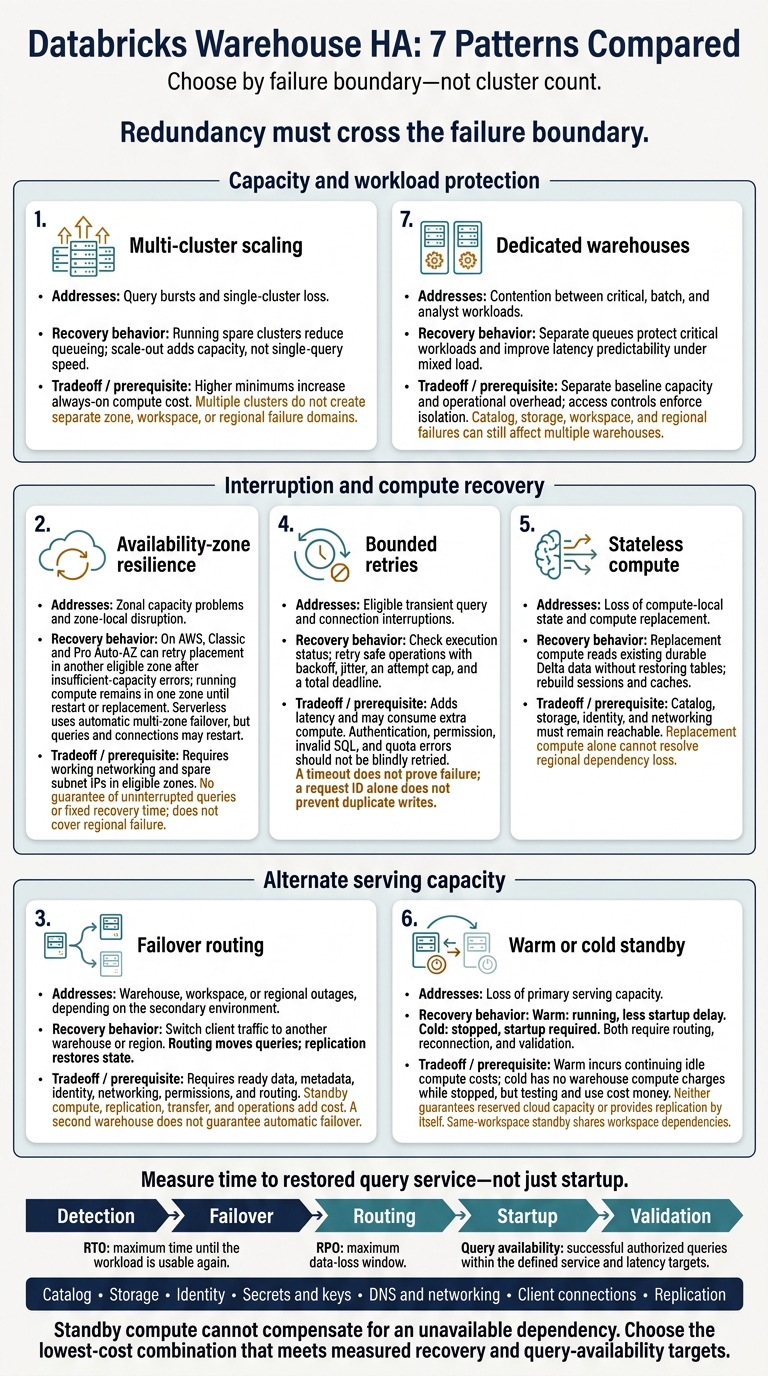
Databricks Warehouse HA: 7 Patterns Compared
Architecting High Availability and Disaster Recovery in Databricks 2026 Strategy
sbb-itb-61a6e59
Set Failure Boundaries and Recovery Targets
Define which failures the seven patterns must survive and how quickly they must restore service.
Query, Cluster, Zone, Workspace, and Regional Failures
A query failure affects one statement or session. A cluster failure interrupts compute. An availability-zone failure can remove compute and network resources in that zone. On AWS, Auto-AZ can retry placement in another zone when capacity is unavailable, but it does not preserve in-flight queries.
A workspace failure can block workspace endpoints or services, requiring a separate workspace. A regional failure requires recovery outside the affected region. Data, configuration, identity, networking, and client routing must all be accessible there.
Document the recovery mechanism and owner for each boundary. Redundancy must cross the failure boundary - adding capacity inside it isn't enough.
These boundaries determine which of the seven patterns can recover the warehouse, which can only reroute traffic, and which need standby capacity.
RTO, RPO, and Query Availability Targets
RTO is the maximum time until the workload is usable again. RPO is the maximum data-loss window. Track data freshness lag separately. Databricks guidance gives illustrative critical-workload targets of under 1 hour RTO and under 15 minutes RPO.
Measure the full recovery path: detection, failover, routing, startup, and validation. Use these targets to decide whether the next patterns need failover, retries, or warm standby.
Define a query-availability target for authorized production queries during stated service hours. Specify whether a successful query must finish within a latency limit and whether approved retries count. Track first-attempt success, success after retry, queueing, timeouts, and data freshness lag separately.
Warehouse Types, Controls, and Dependencies
Warehouse types differ in recovery speed and how much control customers have over dependencies. Match the platform model to your target RTO.
| Warehouse type | Customer controls | Platform-managed behavior | HA limits to verify |
|---|---|---|---|
| Serverless | Warehouse settings, permissions, supported network integrations, and client routing | Databricks operates compute; typical startup is about 2–6 seconds in supported environments. | Confirm regional availability and connectivity. Fast startup does not establish regional failover or preserve in-flight queries. |
| Pro | Compute runs in the customer’s cloud account; customers validate subnets, routes, and security controls | Databricks manages warehouse behavior; typical AWS startup is about 4 minutes. | Check cold-start time against RTO and verify required networking and integrations. |
| Classic | Customer-managed compute and warehouse settings | More infrastructure responsibility remains with the customer; platform features are more limited. | Use only when serverless or pro is unavailable; do not assume feature parity. |
Replacement compute can read existing Delta tables without copying them, as long as storage and metadata remain reachable.
Failover, retries, and standby all rely on shared dependencies. Map Unity Catalog or metastore, object storage, identity, secrets, keys, DNS, private endpoints, client pools, and external sources. Assign each an owner and a recovery procedure.
Databricks manages some placement and control-plane resilience. Customers configure dependency redundancy, retries, routing, replication, and secondary-workspace recovery. Verify support in both selected regions before prescribing settings.
1. Multi-Cluster SQL Warehouse Scaling
Failure Scope and Recovery Behavior
Once you’ve set recovery targets, use multi-cluster scaling to handle load within a healthy warehouse. Databricks distributes concurrent queries across active clusters. Minimum sets warm capacity; maximum sets burst headroom. The default is typically 1 minimum and 1 maximum, which leaves no burst headroom.
Losing a cluster may pause or reschedule work, but multiple clusters do not create separate failure domains. This setup improves availability under load - not during a workspace, zone, or regional failure.
Uptime and Latency Effects
More clusters reduce queueing, but they don’t make a single query faster. Track Peak Queued Queries, waiting_at_capacity_duration_ms, active cluster count, and scale-out time.
The queue holds up to 1,000 queries. For classic and pro warehouses, a query queued for 5 minutes can trigger scale-up, though workload triggers may act sooner. Keeping more clusters warm reduces waiting, but increases always-on cost.
Added Cost and Setup Effort
Increasing the minimum increases always-on cost. Increasing only the maximum keeps idle cost lower, but means more startup delay when demand grows.
After changing these limits, compare DBU consumption with queue time and query latency. Classic and pro warehouses can scale down after 15 consecutive minutes of low load, so costs fall slowly after a spike.
Workload Fit and Recovery Targets
This pattern suits shared BI dashboards, interactive SQL, and applications that send many independent queries. Start with one cluster per 10 concurrent queries as a rule of thumb - not a limit. Check that ratio using representative queries and measured peak concurrency, rather than user count.
Test above normal demand and during capacity loss. Measure cluster activation time, queue latency, burst cost, failure behavior, and time to regain capacity. If recovery takes longer than your target allows, route traffic to another warehouse.
Use this pattern for burst capacity, not as a replacement for zone or regional failover. The next pattern addresses zone-level resilience.
2. Availability-Zone Resilience and Auto-AZ Placement
Failure Scope and Recovery Behavior
Auto-AZ helps place and restart compute. It does not provide simultaneous cross-zone redundancy. Judge zone recovery against your RTO - not just whether the warehouse starts successfully.
For Classic and Pro SQL warehouses on AWS, Databricks selects an Availability Zone based on subnet IP capacity. If it encounters insufficient-capacity errors, it retries in another eligible zone. Once running, a warehouse stays in one zone until restart or replacement, so a zonal failure can still interrupt queries.
Serverless compute uses automatic multi-zone failover, but queries and connections may still restart. Rely on Auto-AZ only when the expected recovery time fits your RTO.
Uptime and Latency Effects
Auto-AZ improves startup success when zone capacity is scarce. It does not guarantee uninterrupted queries or a fixed recovery time. During recovery, measure warehouse startup time, client reconnection time, retry duration, and p95/p99 query latency. Auto-AZ handles zone failure, not region failure.
Added Cost and Setup Effort
Keep spare IPs in every eligible subnet so warehouses have room to restart and grow. Check route tables, NAT gateways, private connectivity, DNS, and object-storage access in each zone. A network dependency tied to one zone can block recovery - even when compute can be replaced.
Auto-AZ itself does not imply idle duplicate compute. Added costs come from redundant networking, monitoring, cross-zone traffic, and any warm standby capacity.
Workload Fit and Recovery Targets
Placement and restart recovery suit ad hoc analytics and scheduled reporting that can tolerate interruptions. For customer-facing analytics, compare measured recovery time with your RTO before relying on Auto-AZ alone.
In nonproduction, test insufficient compute capacity, subnet IP exhaustion, and zonal network loss. Record startup time, query failure rate, and the time needed to restore successful queries. If Auto-AZ misses your RTO, route traffic to another warehouse or region.
3. Failover Routing Between Warehouses or Regions
Failure Scope and Recovery Behavior
Routing moves queries; replication restores state. Use a same-region standby for warehouse failures and cross-region failover for regional loss. Cross-region recovery needs a secondary Databricks workspace with replicated state, plus the supporting identity and network configuration.
Managed Disaster Recovery can replicate Unity Catalog metadata, managed tables, and selected workspace assets - but only those you enable. Verify that replication covers the data and assets your workloads need. When Auto-AZ or a single warehouse cannot meet your RTO, route queries to a secondary warehouse or region.
The routing layer - not compute alone - selects the active warehouse. Use connection profiles or service discovery rather than hard-coded endpoints. Match that layer to your RTO and the person responsible for failover.
Use Databricks’ stable endpoint URL only if your DR setup supports relocation. Otherwise, document the required BI, JDBC/ODBC, auth, and allowlist changes. Neither a second warehouse nor a stable endpoint URL guarantees automatic failover.
Uptime and Latency Effects
Same-region switching usually offers a shorter recovery path. Cross-region recovery adds detection, routing, startup, and validation steps.
Managed recovery can take minutes, but restored SQL warehouses start in a STOPPED state, and paused schedules do not resume automatically. Start the required compute and resume the schedules you need unless your selected configuration explicitly supports automation. Record the last replicated timestamp: writes made after that point may not be available after promotion.
Added Cost and Setup Effort
Budget for standby capacity, cross-region data transfer, and routing and validation overhead. A stopped standby uses less compute but takes longer to recover.
Assign owners to fence writes, switch endpoints, and validate queries. Give one owner responsibility for promoting the secondary.
Workload Fit and Recovery Targets
Use same-region routing for interactive BI and warehouse-specific interruptions. Choose cross-region recovery when customer-facing or critical reporting must survive a regional outage.
Accept a design only after tests meet its RTO and RPO, including the allowed data staleness. Fence the former primary before promotion to prevent competing writes.
Treat failback as a planned change. Verify health, synchronize data and metadata, pause current writes and schedules, switch routing, and validate before resuming production.
Use bounded retries to cover brief interruptions during promotion and endpoint switching.
4. Bounded Query Retries and Idempotent Recovery
Failure Scope and Recovery Behavior
After routing, use bounded retries to handle brief interruptions during startup or endpoint switching. A timeout does not prove the query failed. Check the statement or execution ID before retrying. If the query is still queued or running, wait.
Databricks may auto-start a stopped warehouse when new work arrives, but that is not a client retry. The runbook should treat retry, auto-start, and failover as separate actions.
| Observed failure | Action | Stop or escalate when |
|---|---|---|
| Connection reset or temporary service error | Retry with backoff only after confirming replay is safe | The attempt limit or deadline is reached |
| Repeated endpoint failure or prolonged queue | Check status; stop when the retry budget runs out | Both endpoints fail or execution remains uncertain |
| Authentication, permissions, invalid SQL, or quota error | Do not retry; involve the responsible operator | Configuration, code, or capacity needs correction |
| Timeout after a non-idempotent write | Check execution status and committed results | The outcome remains unknown and requires reconciliation |
Keep one operation ID across retries and rerouting. Log it alongside the statement or execution ID, target warehouse, attempt number, start time, and outcome.
For writes, use deterministic batch or event keys, staging, and replay-safe MERGE logic. Verify committed results before replaying an operation with an uncertain outcome. A request ID alone does not prevent duplicate writes.
Uptime and Latency Effects
Bounded retries can recover from brief interruptions, but backoff adds to tail latency. Set an attempt cap, maximum delay, and total deadline. Add jitter and honor Retry-After without exceeding that deadline.
Measure availability in two ways: first-attempt success and success within the recovery objective. Track p50, p95, and p99 latency separately for first attempts, retried requests, warehouse-startup requests, and rerouted requests. Do not claim a fixed uptime gain without workload-specific measurements.
Added Cost and Setup Effort
Duplicate submissions can use extra compute even if the first request succeeded. Put one system in charge of retries, cap concurrency, and use a circuit breaker during sustained failures.
Coordinate dashboard retries rather than letting every tile retry on its own. Limit incoming requests while the warehouse recovers. Budget engineering time for status checks, correlation logs, and write-recovery testing. Advanced teams often master data engineering principles to automate these recovery workflows.
Workload Fit and Recovery Targets
Use this pattern for read-only dashboards and scheduled reporting that can tolerate a bounded delay. Allow write retries only when idempotency has been verified and status checks are in place.
Tune retry budgets using measured startup and recovery times. Test connection loss before and after submission, startup delays, and queued queries. When the budget runs out, surface the failure or invoke the runbook. These retries bridge short interruptions; the next pattern removes more state from the recovery path.
5. Stateless Compute and Decoupled Lakehouse Storage
Failure Scope and Recovery Behavior
When retries fail, separating compute from durable data keeps recovery simple. You can replace compute while Delta data stays in place, though query state, caches, and sessions must be rebuilt.
This pattern handles compute, cluster, and warehouse failures. But it still relies on catalog, identity, networking, and storage services. Replacing compute alone won’t fix a regional outage if those services are unavailable.
Uptime and Latency Effects
What matters is how soon queries succeed after compute is replaced. You avoid a full data restore, but recovery still takes time: compute must be allocated, connections restored, metadata loaded, and queries run against empty caches.
Serverless cuts infrastructure management work. It doesn’t remove every recovery delay. Measure time to first successful query, not just warehouse start time.
Added Cost and Setup Effort
Decoupling avoids duplicating tables, but replacement compute still needs repeatable warehouse settings, grants, secrets, and network paths. Those paths must reach storage through the intended DNS and private endpoints.
Cold replacement cuts idle compute spending. Warm capacity costs money while waiting, but it can shorten recovery.
Workload Fit and Recovery Targets
Use this pattern when restart time, rather than data loss, is the main constraint. It fits reporting, ad hoc analytics, and scheduled transformations that can restart against durable data.
Set separate targets for compute replacement, the first successful read, and write recovery. During a controlled interruption, test cache loss, permissions, and access to committed Delta data. Durable Delta data alone does not guarantee end-to-end RPO when regional replicas or external systems are involved.
6. Warm and Cold Standby Warehouses
Failure Scope and Recovery Behavior
Add standby capacity when retries and routing aren't enough. A warm standby stays running; a cold standby stays stopped. Both offer another endpoint for compute recovery - not data replication or regional failover.
A standby in the same workspace still shares that workspace's dependencies. To cover a regional outage, it also needs working regional data access, identity, networking, and catalog services.
Uptime and Latency Effects
Failover requires detecting the outage, starting the standby if needed, redirecting clients, and passing a read-only check. Interrupted queries still need safe retries with clear limits.
Measure total failover time against RTO. A running endpoint doesn't mean service has recovered.
Added Cost and Setup Effort
Use this table for planning only. Keep standby configuration in sync through code, and compare settings through the Databricks SQL Warehouses API. A stopped warehouse doesn't sync grants or routing on its own.
| Dimension | Warm standby | Cold standby |
|---|---|---|
| Idle cost | Running compute keeps accruing DBU and applicable cloud-instance charges while idle. | No warehouse compute charges while stopped; testing and use still cost money. |
| Recovery latency | Little startup delay if already running, but reconnection and validation still take time. | Startup time matches the underlying warehouse type. |
| Capacity guarantee | Does not guarantee reserved cloud capacity. | Must acquire capacity during recovery. |
| Configuration drift | Keep size, cluster limits, permissions, network access, and routing aligned. | Maintain the same settings while stopped; inactivity can hide drift. |
| Failover tests | Test authentication and representative reads under failover load. | Test API startup, authentication, data access, first-query latency, and rollback. |
Workload Fit and Recovery Targets
Choose warm standby for customer-facing analytics or operational dashboards with strict query-availability targets. Cold standby fits internal reporting, batch analytics, or regional recovery that can tolerate several minutes. Set auto-stop deliberately so a warm standby doesn't silently become cold.
Test access monthly - or more often for strict RTOs. Verify startup and authentication, then run a representative read-only workload at the expected failover concurrency. A connectivity probe alone isn't enough.
Record startup latency and full recovery time. A warm standby may accept connections without having enough capacity for the primary workload. Standby reduces recovery time; the next pattern reduces workload interference.
7. Workload Isolation with Dedicated Warehouses
Failure Scope and Recovery Behavior
Assign critical dashboards and applications to dedicated Databricks SQL warehouses, separate from ad hoc analysis and batch refreshes. Each warehouse has its own queue, so batch work cannot starve interactive requests.
This reduces contention, but it does not remove shared points of failure. Storage, identity, networking, catalog, workspace, and regional failures can still affect multiple warehouses. Measure whether the split reduces queueing and tail latency under mixed load.
Uptime and Latency Effects
Isolation makes latency more consistent by keeping unrelated workloads from competing for admission, available cluster capacity, memory, and scaling capacity. Compare queue time, p95/p99 latency, and timeout rates before and after separating critical and noncritical workloads. Include peak batch load in those measurements.
Added Cost and Setup Effort
The main tradeoff is baseline capacity. Multiple warehouses can require multiple minimum cluster allocations, even when demand is low. Dedicated warehouses improve isolation and make it easier to attribute costs. They also add work around monitoring, permissions, budgeting, and ownership.
Use access controls and query tags so only approved applications and service principals reach the critical endpoint. Naming alone does not enforce isolation. Review auto-stop settings and cluster limits for each warehouse separately.
Workload Fit and Recovery Targets
Choose dedicated warehouses when workloads differ in latency targets, access rules, scaling schedules, or ownership. Add clusters to a single warehouse when workloads share similar priorities, security requirements, query characteristics, and recovery expectations.
Set recovery targets for each workload. Dashboards need query availability and latency targets; batch jobs need completion deadlines. Test contention by running representative batch and analyst loads while checking whether production targets hold.
Isolation reduces contention, but it does not replace failover or standby capacity. Use the test results to compare isolation with scaling, routing, retries, and standby capacity.
Compare Failure Coverage, Latency, and Cost
Choose by failure boundary, not feature count. Extra clusters help handle demand spikes. An alternate region helps when a region fails. But neither solves an outage in shared catalog, storage, or control-plane dependencies.
The table shows typical effects, not guarantees. Use it to choose a mix of patterns, then check that mix in recovery tests.
| Pattern | Primary failure addressed | Failure coverage | Latency effect | Cost impact | Setup requirements | Best fit |
|---|---|---|---|---|---|---|
| Multi-cluster SQL warehouse scaling | Query bursts and single-cluster loss | Handles bursts and single-cluster loss, but not workspace or regional failure | Running spare clusters reduce queue latency; scaling up during bursts adds delay | Variable compute costs; higher minimums add idle cost | Warehouse size, cluster limits, concurrency monitoring, and workload thresholds | Continuity during capacity incidents |
| Availability-zone resilience and Auto-AZ placement | Zonal capacity problems and zone-local infrastructure disruption | Improves zone placement and reduces dependence on one zone | Placement retries can delay startup | Redundant networking and cloud infrastructure; compute costs depend on usage | Eligible-zone subnets, spare IPs, storage redundancy, and tested networking | Selected zonal failures or capacity shortages |
| Failover routing between warehouses or regions | Warehouse, workspace, or regional failure | Supplies alternate serving capacity when the primary fails | Endpoint switching, reconnection, startup, metadata checks, and cache loss add recovery delay | Standby compute, replication, networking, monitoring, and operations | Routing, client reconnection, replicated data and metadata, permissions, secrets, and runbooks | Broad failure coverage |
| Bounded query retries | Transient query or connection interruption | Automatically recovers eligible transient errors | Backoff and repeated execution add delay | Duplicate execution and compute use | Error allowlist, jitter, deadline, and idempotency | Fast transient-error recovery |
| Stateless compute and decoupled lakehouse storage | Loss of compute-local state | Replacement compute reads durable data | Cold reads and cache rebuilding slow recovery | Storage redundancy and metadata protection | Durable Delta data; recoverable catalog and session handling | Compute-replacement recovery |
| Warm or cold standby warehouses | Loss of primary serving capacity | Supplies extra capacity for outage recovery | Warm: less recovery delay; cold: startup and validation delay | Warm: continuing compute costs; cold: lower idle compute costs | Secondary capacity with tested dependency access | Strict recovery targets when warm; more tolerant targets when cold |
| Dedicated warehouses | Contention between workload classes | Keeps critical workloads usable during spikes or failures in other workloads | More predictable latency for protected workloads | Separate capacity baselines and operations | Separate endpoints, access controls, and owners | Workload continuity |
Query latency and recovery delay are different measures. Scale-up triggers are not recovery targets. Replicated warehouses still start stopped, so they are not ready-to-serve capacity.
Combine dedicated warehouses for workload isolation, multi-cluster scaling for dashboard concurrency, AWS Auto-AZ placement, bounded idempotent retries, replaceable compute over durable replicated lakehouse storage, and a warm secondary environment reached through tested failover routing. This combines capacity, transient-error, zonal, and regional recovery paths.
Choose the mix based on failure coverage and recurring capacity costs. Standby compute cannot compensate for an unavailable dependency. Set RTO using measured delays for endpoint switching, startup, catalog access, and storage access. Set RPO based on replication behavior - not warehouse count.
Next, test those choices against interruptions, startup delays, and failback.
Test Recovery and Update Runbooks
Use the selected patterns to test recovery through real client paths, not just configuration checks. Check routing, retries, standby capacity, and regional recovery against agreed targets.
Test Query Interruptions and Endpoint Switching
Define a controlled test window, the affected warehouse, a query pack, abort criteria, and a rollback owner. Include representative reads, a dashboard aggregate, and an idempotent write only if writes are in scope.
Interrupt the client connection, then separately make the primary warehouse unavailable. Record query IDs and check execution status before retrying. Never blindly resubmit a write with an uncertain outcome. Verify that it committed once and produced no duplicate downstream notification.
Test endpoint switching through production clients - JDBC/ODBC and dashboards - not just the SQL editor. Confirm that sessions recover and only eligible requests are routed. Compare success rates, retries, p95 end-to-end latency, and routed requests before, during, and after switching. Use waiting_at_capacity_duration_ms to spot queue growth on the secondary. Mark recovery as failed if retries saturate the healthy target or exceed the latency budget.
Measure Standby Startup and Regional Recovery
After testing endpoint switching, measure how long standby capacity takes to reach service targets. Test warm and cold standby separately under both light and peak load.
Timestamp outage detection, endpoint switching, connection acceptance, the first successful query, and restored service levels. Use these timestamps to measure observed RTO to the agreed recovery point. Record success rate, queue time, p95 latency, and both median and slowest recovery across drills.
Report incremental costs in USD for compute, storage, transfer, parallel operation, and operator time. Keep drill costs separate from recurring standby costs.
Run regional drills only in deployments configured for cross-region recovery. Use them to validate failover routing and standby recovery. For a planned cutover, drain writes, confirm replication progress, follow the documented failover procedure, and validate recovered data before resuming required schedules.
Record the latest replicated commit and the latest available data after recovery to measure the data gap against RPO. A drained cutover does not prove how much data an unexpected outage could lose. Databricks Managed Disaster Recovery requires starting replicated SQL warehouses and resuming needed schedules.
Check Dependencies, Owners, and Failback
Close each drill by checking the dependency chain and confirming the named owners for switching and failback. Test catalog, storage, credentials, permissions, networking, dashboards, jobs, and external services through their production access paths.
Assign named owners for incident response, routing, data validation, and failback. Document measurable switching and failback thresholds, along with commands, approvals, and abort conditions.
Failback must check data currency, drain secondary traffic, restore schedules, and detect duplicate processing. Save timestamped results and assign every defect an owner and due date. Repeat drills after changes to sizing, routing, authentication, networking, catalogs, or replication.
Conclusion: Combine Patterns and Verify Recovery
After testing recovery, focus on business-critical query paths. Give each path an owner, a query-availability target, an RTO, an RPO, and an interruption limit.
Match patterns to the scope of each failure. No single pattern covers every failure boundary, so test the combination across the full client-to-data path.
Faster recovery and stronger isolation usually need more capacity, duplication, or operations. Warm standby costs more but recovers faster. Cold standby costs less but recovers slower. Choose the lowest-cost combination that meets your targets.
Check current Databricks documentation for warehouse controls, cloud-specific zone behavior, and managed disaster-recovery support. Use those capabilities as design inputs - not promises of uninterrupted queries. A design is ready only when measured recovery meets the target.
FAQs
Which HA patterns should I prioritize on a tight budget?
Focus on patterns that reduce idle compute and make better use of resources:
- Use serverless compute for interactive workloads with bursts of activity. It offers instant scaling, scale-to-zero, and no minimum billing durations.
- Run scheduled ETL on job clusters. They’re 30–50% more cost-efficient than all-purpose compute and shut down automatically.
- Use spot worker nodes for batch jobs to cut infrastructure costs by 40–60%.
- Optimize data with liquid clustering or Z-ordering to reduce scans and compute use.
How do I set realistic recovery targets for my workload?
Match your recovery targets to your pipeline’s needs. Use Databricks Jobs for automatic restarts with exponential backoff and Jobs compute to isolate production workloads. Give each streaming query its own checkpointLocation so it can recover from its last recorded state.
For non-critical or batch tasks, use Trigger.AvailableNow to control costs. For ultra-low latency, use RocksDB with asynchronous state checkpointing. Monitor num_queries_on_affected_tables and avgOffsetsBehindLatest to spot issues early.
When should I automate warehouse failover?
Automate warehouse failover when the cost of downtime outweighs the complexity of standby capacity or multi-cluster routing. It helps maintain high availability during regional or cluster-level outages, especially for mission-critical production workloads where manual intervention can't meet uptime SLAs.
Automated failover sends query traffic to healthy clusters or regions without manual intervention, keeping service running during infrastructure issues or planned maintenance.