Airflow max_active_runs vs Pools
I use max_active_runs to limit overlapping runs of one DAG and pools to limit tasks sharing a database or API. Set max_active_runs=1 when runs could conflict, then assign every task using the shared system to a pool sized through load testing.
The difference is what waits: a run or a task. <u>Neither limit replaces the other.</u>
Quick Comparison
| What I need to control | max_active_runs |
Pools |
|---|---|---|
| Scope | Runs of one DAG | Assigned tasks across DAGs and runs |
| Limit | Active DAG runs | Slots consumed by tasks |
| What waits | Additional runs | Tasks needing free slots |
| Example | 1 prevents run overlap |
Four slots allow two tasks using two slots each |
| What it does not provide | A shared-resource limit across DAGs | Run serialization, per-DAG capacity guarantees, or requests-per-second limits |
I use both when correctness and shared capacity matter. Pool-blocked tasks still belong to active runs, and free slots cannot bypass a run limit. Before changing either setting, I check Airflow version behavior, task dependencies, worker capacity, and database load. For those looking to master data engineering at scale, understanding these scheduler nuances is critical. Retries still need safe writes - even when runs execute one at a time.
Airflow max_active_runs vs Pools: What Waits?
What max_active_runs and Pools Limit
max_active_runs: Limit Runs Within One DAG
DAG-level max_active_runs overrides [core] max_active_runs_per_dag. Airflow 2.11 lists the default as 16, but check your deployed version and configuration rather than assuming it applies. Setting the value to 1 makes scheduled and catchup runs execute one at a time. It does not clear the backlog.
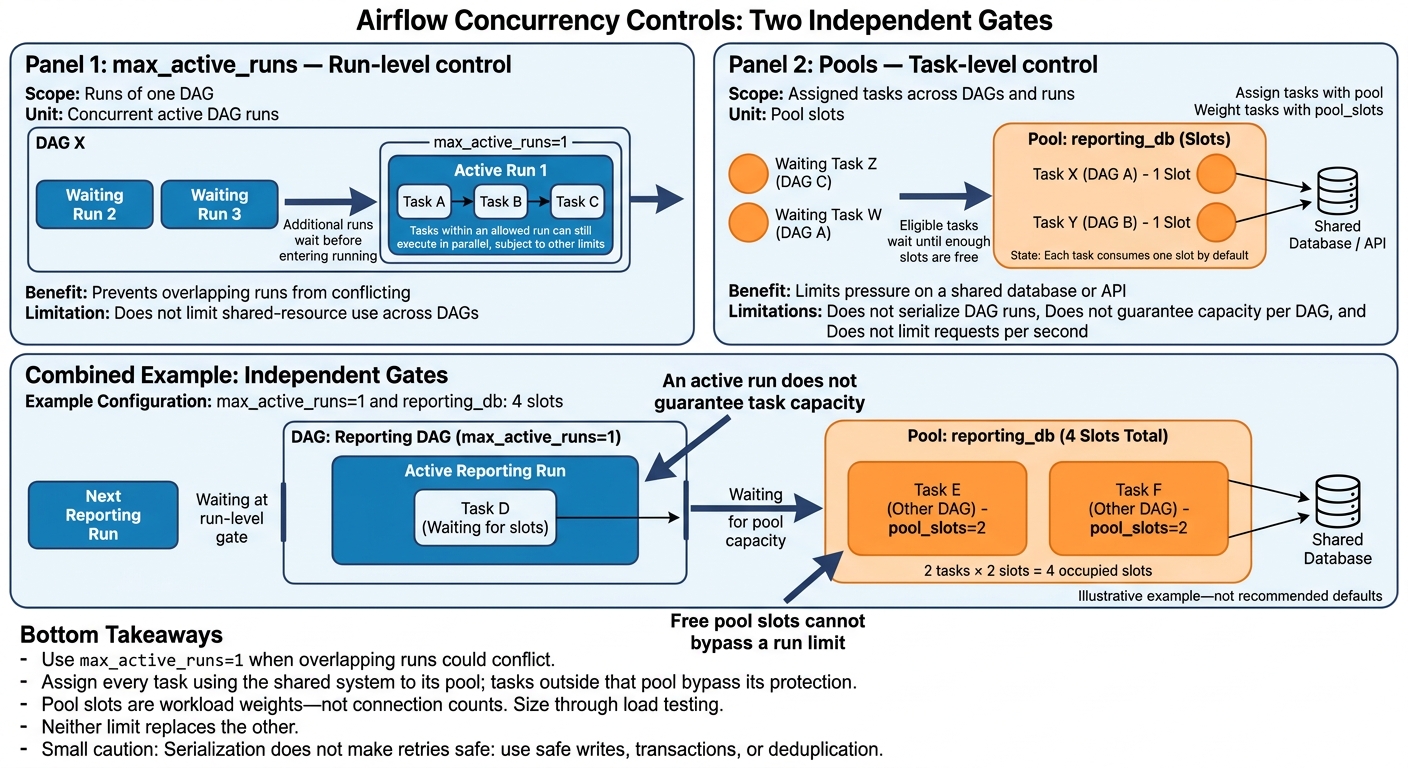
A run waiting for capacity doesn't count as an active concurrent run. Within an allowed run, tasks can still execute in parallel, subject to task and executor settings.
Current docs give backfills separate concurrency controls, so verify your version before relying on DAG-level limits. Pools let you limit pressure on shared systems within those allowed runs.
Pools: Limit Tasks Across DAGs
Once run overlap is acceptable, pools cap the tasks that access a shared system. A pool is a named slot limit: assign tasks with pool, and use pool_slots to give heavier tasks more weight. Each task consumes one slot by default. These weights are estimates - not measurements of connections, memory, or query cost - so size them through workload testing.
When no slots are available, or too few remain for a task's weight, ready tasks wait for capacity. They may not appear as queued. Pools limit assigned tasks, not DAG runs: they neither prevent runs nor make them execute one at a time. External clients and tasks in other pools remain unaffected.
Pools also don't cap requests per second. Task code can still send a burst of requests while holding a slot, so use app-level throttling for API rate limits. For deferrable operators, decide whether deferred tasks should keep a slot based on whether the external resource stays reserved. This behavior depends on pool configuration and your Airflow version.
sbb-itb-61a6e59
A deep dive into Airflow configuration options for scalability
max_active_runs vs Pools: Scope and Waiting
Run limits and task limits are separate controls. max_active_runs controls overlapping DAG runs, while pools limit task access to shared resources.
| Setting | Scope | Unit of control | What waits | Strength | Where it’s set | What it does not control |
|---|---|---|---|---|---|---|
max_active_runs |
One DAG | Concurrent active DAG runs | Additional runs wait before entering running |
Setting 1 prevents concurrent runs from conflicting over shared staging data or non-idempotent writes |
DAG definition | Shared-resource use across DAGs |
| Pools | Tasks assigned to a named pool | Pool slots | Eligible tasks wait until enough slots are free | Protects a shared database or warehouse | Pool administration in the UI or CLI; task-level pool and pool_slots |
DAG run overlap, unassigned tasks, or a guaranteed share for each DAG |
A waiting task stays pending until enough pool slots are free. Unused pool slots don’t let a waiting DAG run bypass its run limit.
Strengths and Limits of Each Control
Use max_active_runs to prevent collisions between overlapping runs. Use pools to keep tasks from overwhelming shared infrastructure. A pool does not reserve capacity for each DAG: one DAG can occupy all available slots.
Use max_active_tasks separately if you also need to cap task concurrency within a DAG.
Use Both Controls for a Shared Database
Consider a reporting pipeline that extracts data, transforms it, and writes reports to a database shared with other reporting DAGs.
Use max_active_runs to prevent conflicting writes and pools to limit database load. Set pool capacity based on load tests that measure CPU, I/O, connections, locks, and query latency. All slot counts below are examples, not recommended defaults.
Set the Run Limit and Create a Pool
Use this skeleton for an Airflow 3.x DAG. Keep max_active_runs=1 when runs update shared summaries or rely on a shared watermark. Consider 2 only after tests confirm that runs write independently - for example, to separate reporting-date partitions - and the database can safely handle overlapping runs.
from airflow.sdk import DAG
from airflow.providers.standard.operators.python import PythonOperator
from pendulum import datetime

with DAG(
    dag_id="reporting_pipeline",
    start_date=datetime(2025, 1, 1, tz="UTC"),
    schedule="@daily",
    catchup=False,
    max_active_runs=1,
) as dag:
    pass  # Replace with task definitions.
Create reporting_db in Airflow’s Pools UI or with the Airflow 3.x CLI command below. Use four slots only if load tests confirm that capacity works under representative traffic.
airflow pools set reporting_db 4 "Shared reporting database capacity"
Assign Tasks to Pool Slots
Inside the DAG block, use your reporting functions as the callables. A task with pool_slots=2 takes two slots at once, so a four-slot pool can run at most two of those tasks concurrently.
Pool slots are weights, not connection counts. A heavy write might need two slots even if it opens just one connection. Assign every task that uses this database to reporting_db, including extracts and database transforms in other DAGs. Tasks outside the pool bypass its protection.
write_summary = PythonOperator(
    task_id="write_summary",
    python_callable=write_summary_data,
    pool="reporting_db",
    pool_slots=2,
)

publish_metadata = PythonOperator(
    task_id="publish_metadata",
    python_callable=publish_metadata_data,
    pool="reporting_db",
    pool_slots=1,
)

write_summary >> publish_metadata
Follow Waiting Runs and Tasks
After setup, check run state and pool usage separately.
Two tasks from other DAGs, each requiring two slots, can fill
reporting_db, making an eligible task inside the active reporting run wait.
Free pool slots cannot release a run blocked by max_active_runs. Likewise, an active run does not guarantee capacity for its tasks. Task state alone does not tell you the bottleneck - check pool usage, dependencies, and executor capacity.
Conclusion: Choose Limits for Correctness and Capacity
Choose the control based on what needs to wait: a run or a task.
| Requirement | Control |
|---|---|
| Prevent runs of the same DAG from overlapping | max_active_runs=1 |
| Protect a shared database, API, or other service | A pool sized to tested capacity |
| Give heavy tasks more capacity weight | pool_slots greater than 1 |
| Limit both runs and shared-resource use | max_active_runs plus a pool |
Serialization reduces overlap, but it doesn't make a workflow idempotent. Retries still need safe writes, transactions, or deduplication.
Before increasing either limit, load-test representative traffic. Review waiting runs, task states, pool use, latency, errors, and worker capacity. Change one control at a time, and keep the change only if throughput increases without breaching latency or error thresholds.
FAQs
How can I identify which limit is blocking my tasks?
Check task states alongside concurrency metrics. Tasks stuck in queued often point to scheduler resource starvation, while tasks in scheduled may be waiting for pool slots.
Use scheduler.tasks.starving (unavailable pool slots), executor.queued_tasks (backlog), and task.queued_duration (queue time) to identify what’s blocking task starts: DAG limits (max_active_runs, max_active_tasks_per_dag), pools, or global parallelism.
Then verify your configuration values, including max_active_runs, with airflow config get-value.
How can I prevent one DAG from monopolizing a pool?
Assign the DAG’s tasks to a dedicated pool with the operator’s pool parameter. In the Airflow UI, go to Admin > Pools and set the pool’s slot count to match the capacity of your external resource.
For tasks that need more resources, use pool_slots to make each task consume more slots. This gives you more control over resource usage.
What happens if my task needs more slots than the pool has?
A task must wait if it needs more slots than its assigned pool has available. Spare worker capacity doesn’t override the pool limit.
Check logs and metrics for tasks that stay scheduled even when workers have free resources. Once enough pool slots are available, the scheduler uses the task’s priority_weight to determine execution priority.